
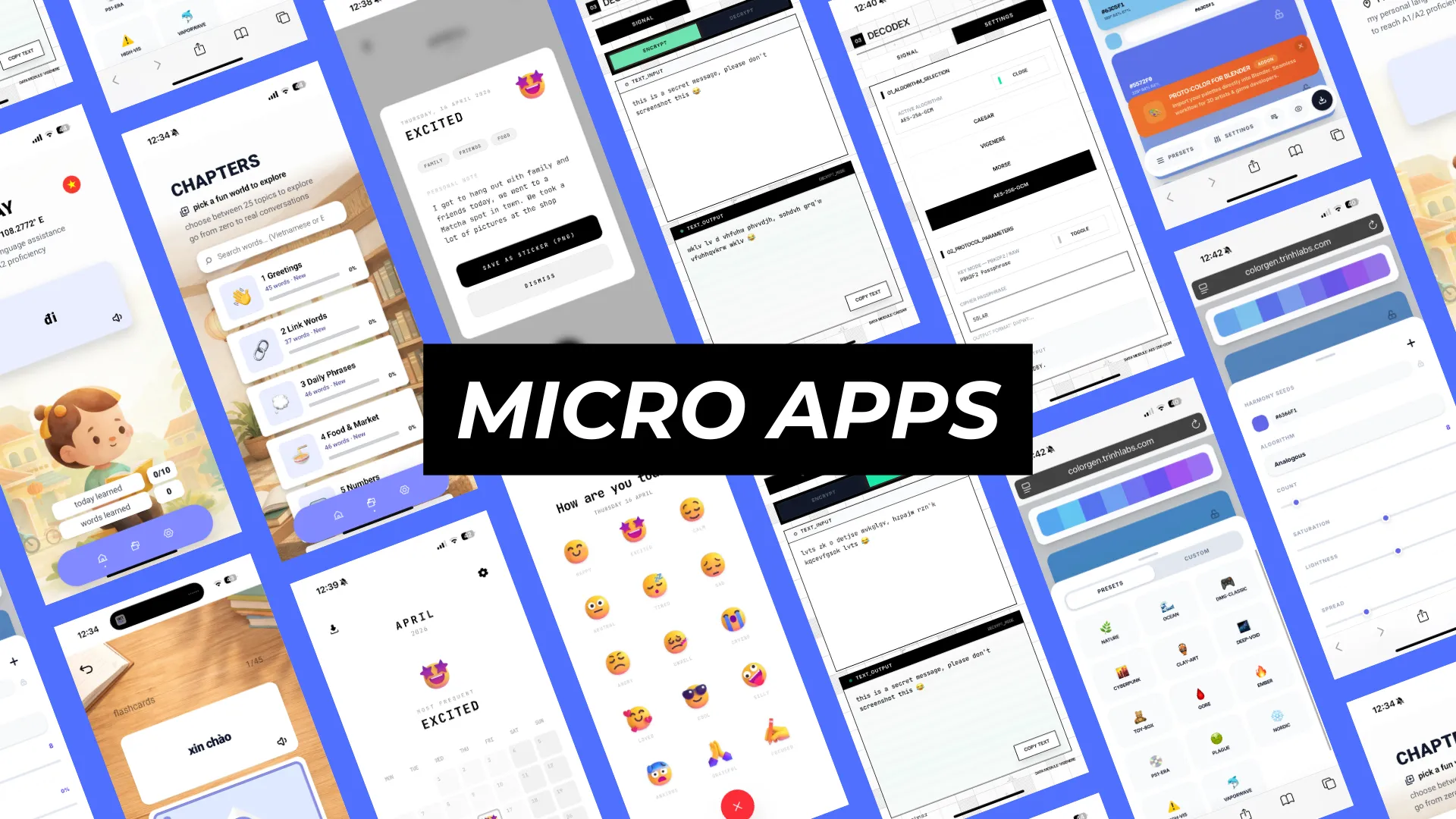
The Micro Web Apps are available for free on my personal prototyping platform where I test out and share apps for everyone to see and experience → https://trinhlabs.com/
PRODUCT: Micro Web Apps
DEVELOPER: Trinh Nguyen
ROLE: PRODUCT DESIGNER 2026
This case study is not about one product ecosystem. It is about a collection of small app prototypes that share the same UX principle: less fluff, more clarity, and a tighter focus on one useful interaction at a time.
I created these micro apps, to learn more about app development, including frontend, backend and understanding the tech stack. I created all these apps with the same thought process, what do users want, does it already exist and if so, how can I improve on it? → https://trinhlabs.com/
VietPlay
Decodex
MoodCapture
ColorGen
The current micro app set includes:
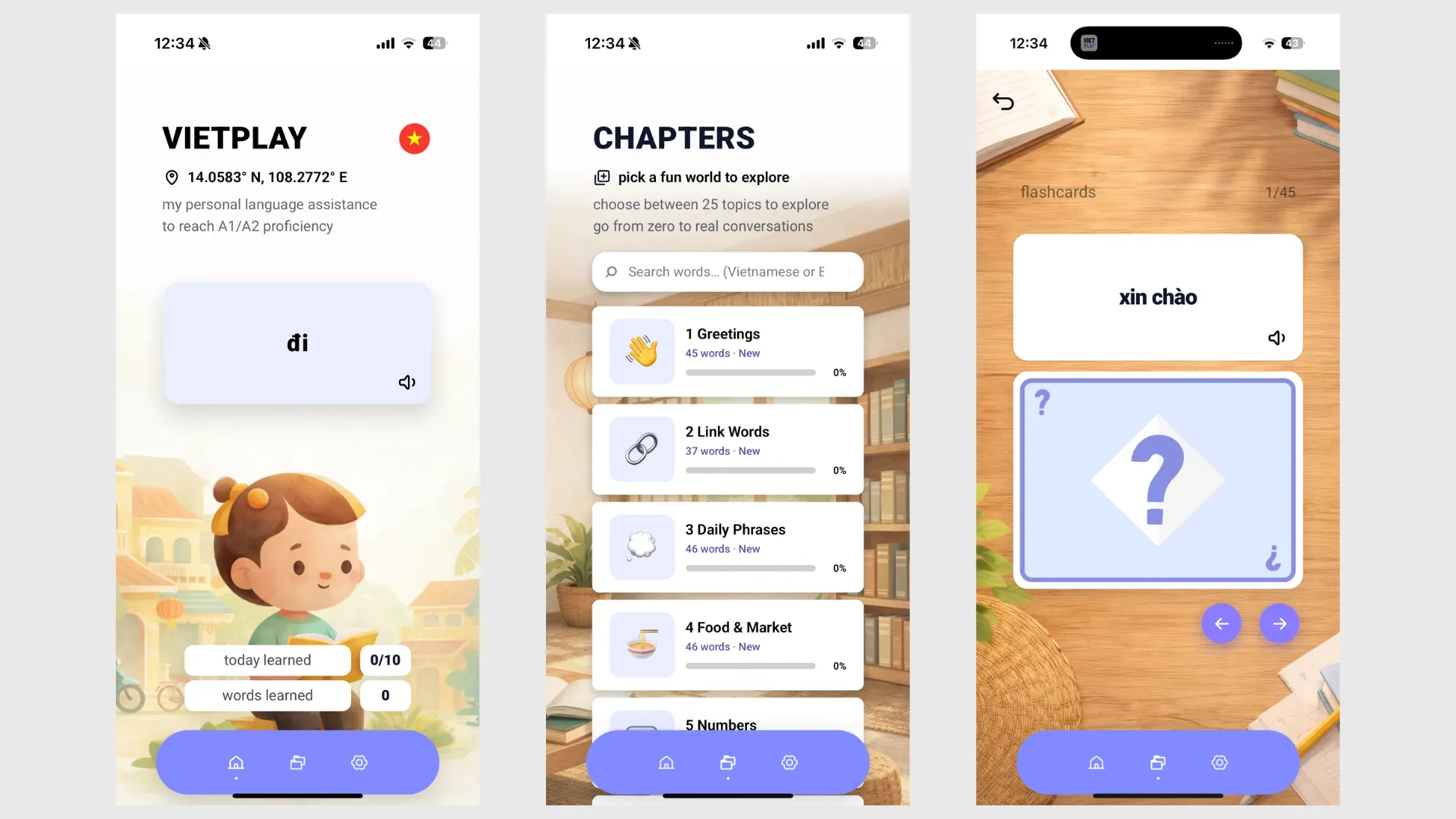
• VietPlay, a Vietnamese learning app centered on high-frequency vocabulary, flashcards, and realistic pronunciation
https://vietplay.trinhlabs.com/
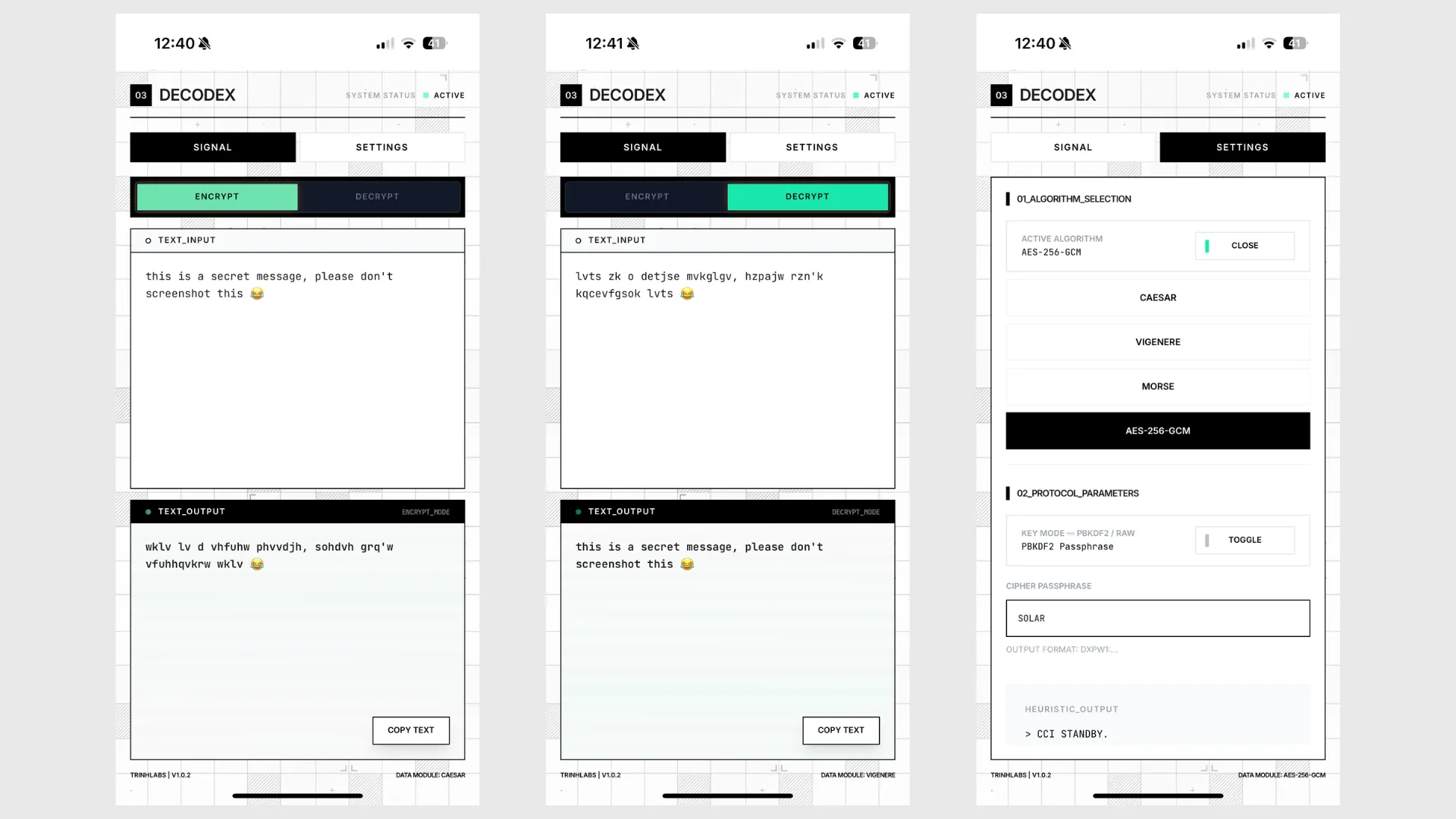
• Decodex, a privacy-first encode and decode tool for secret messages and offline use
https://decodex.trinhlabs.com/
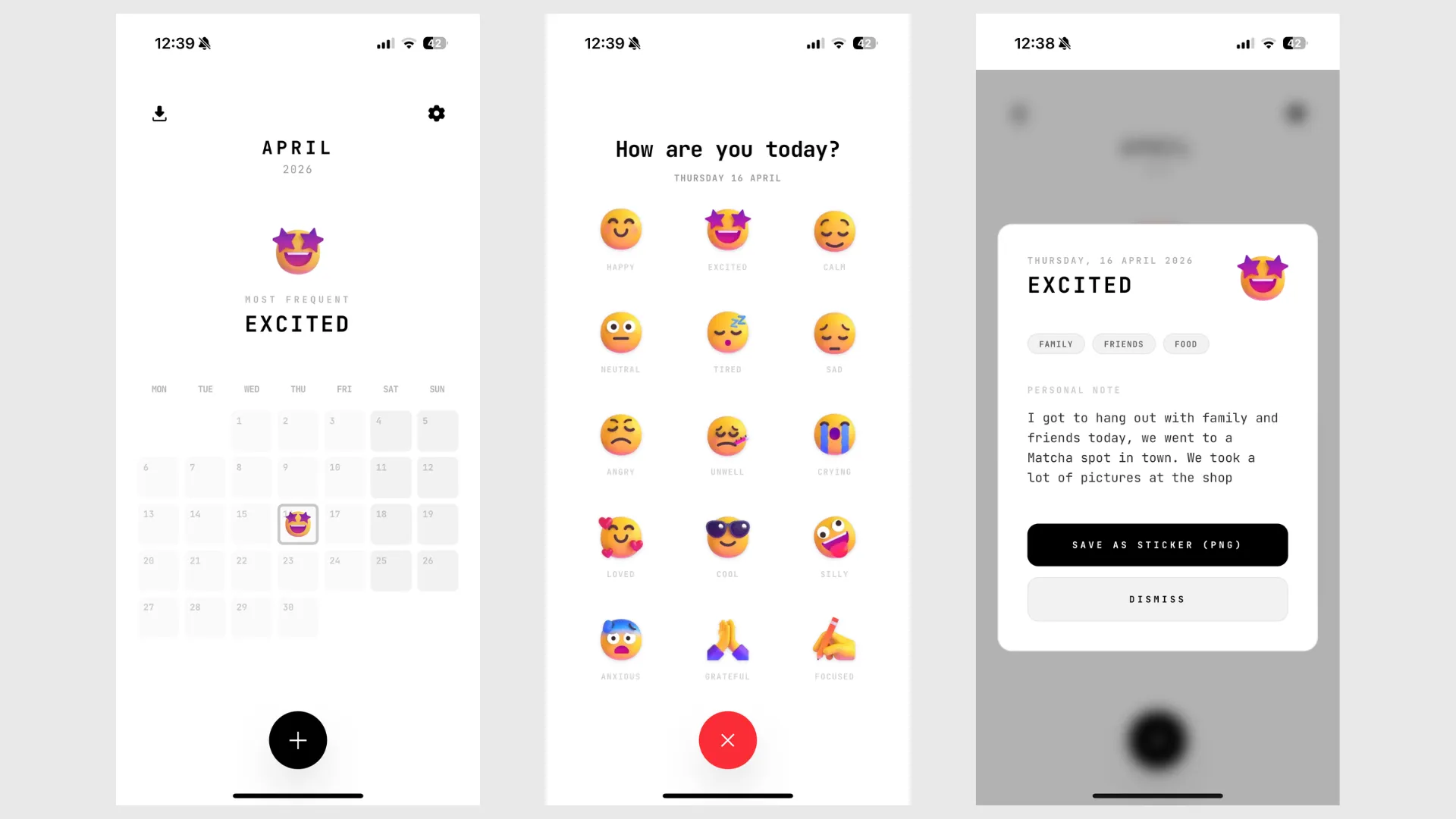
• MoodCapture, a minimal mood journal built around expressive emoji and fast daily check-ins
https://moodcapture.trinhlabs.com/
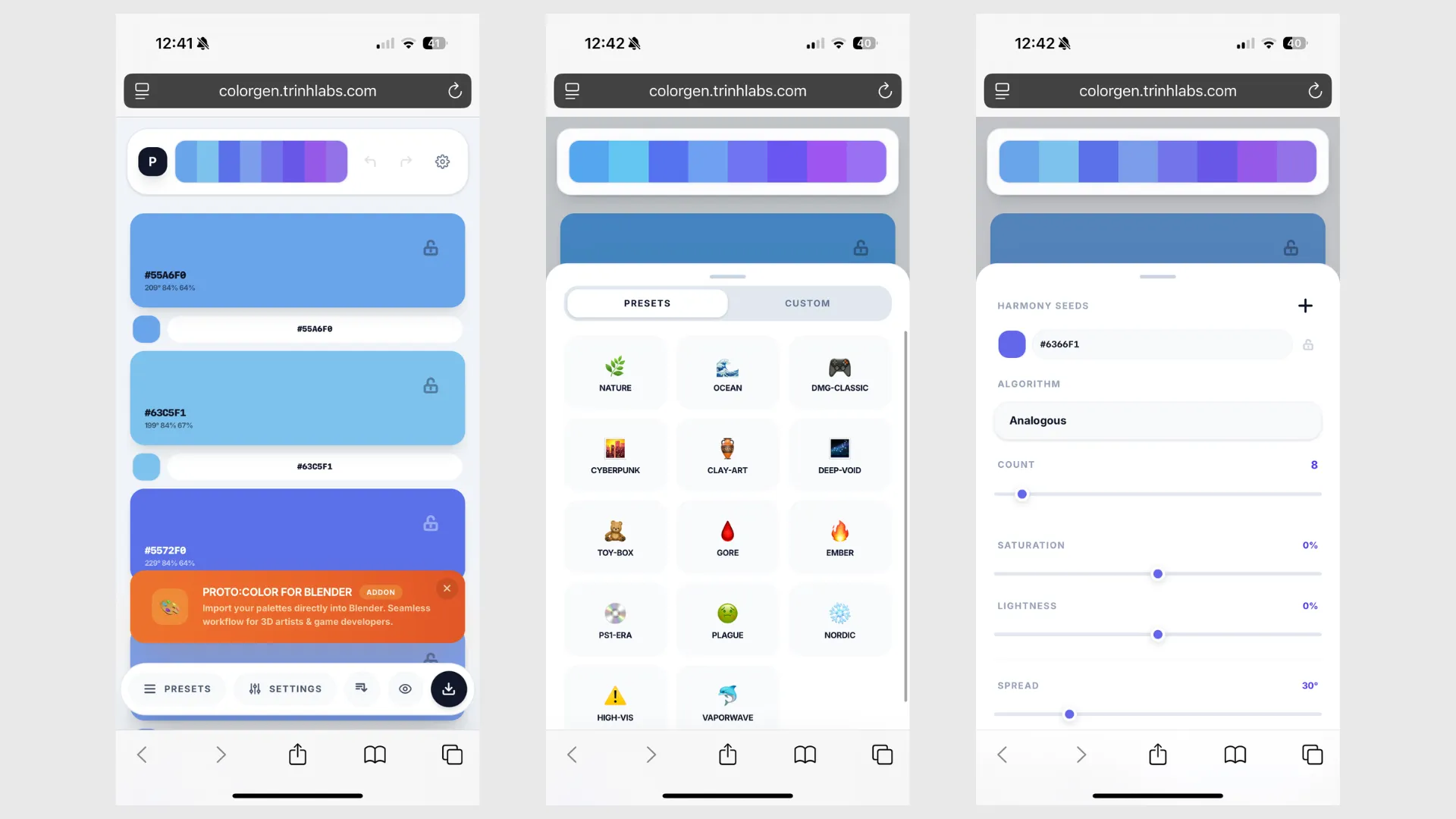
• PROTO:COLOR Generator / ColorGen, a free web palette builder that supports the PROTO:COLOR and PROTO:PALETTE Blender workflow
https://colorgen.trinhlabs.com/
For all of these prototype I am using this as the base:
Language/syntax
TypeScript / TSX
Framework
React
Build tool
Vite (PWA)
Styling
TailwindCSS
Animation
Framer Motion
Deployment
Cloudflare Pages
After my first two prototypes, I noticed that I kept reusing the same tech stack. I came with the idea to make a template that I could copy and re-use to create any future prototypes. This saves me time.
With the recent advancements in AI, I like to make my prototypes with Github Copilot Pro+, using Claude OPUS and GPT. These tools don't replace the design aspect for me, I still like to have full control on the design aspect, but where AI comes in handy are the posibility to rapid prototype features and compare multiple ideas with one another. For someone who has tech experience, but isn't the best coder, this has bridged the gap for me and allowed me to think more like a problem solver, product manager and designer.
Across learning, privacy, journaling, and creative utilities, the same UX issue kept appearing: simple jobs were being handled by products that felt too heavy.
• language apps often add noise, and gamification loops, instead of focusing on the experience of learning real useful words that users can learn to reach a certain level. When does an user actually reach A1 or A2 fluency in a language?
• privacy tools often feel technical, intimidating, or tied to online services that weaken the feeling of control. with the rise of apps removing message encryption, what can we use to encode or messages or secret texts?
• journaling apps often ask for too much writing when the user only wants to capture how they feel in a few seconds. can't we just make an app in which we can just add our mood quickly and forget about it for the day?
• palette tools often stop at color generation and do not connect well to an actual art pipeline. how can it connect better to apps like Blender, how can we make the color palette generator usefull for things like games?
That made the design direction clearer, I knew this was going to be part of my brand. It was to prototype small, calm tools where each interaction is fast, obvious, and worth returning to.
The prototype set is designed around concrete use cases rather than abstract personas:
Vietplay
Early-stage Vietnamese learners who want to reach A1-A2 fluency and lower-friction repetition
Decodex
Users who want to encode or decode messages privately without depending on a server-side workflow
MoodCapture
People who want to track mood consistently but are put off by heavy journaling interfaces
PROTO:COLOR Generator / ColorGen
Artists, stylized creators, and Blender users who want an additional way to create color pallettes specialized for games
The direction came from repeated personal workflow friction and from studying how existing products fail when they try to solve small jobs with too much interface weight.
Several practical insights shaped these prototypes:
• Micro apps work best when they remove ceremony rather than add more systems
• Install friction matters, which made PWA delivery a strong fit for this product direction
• Privacy is not just a policy statement; it has to be reflected in offline behavior, local storage, and the absence of unnecessary accounts
• For language learning, believable pronunciation matters more than adding generic content volume. Users want to know how to pronounce words, so that they can use it in real conversations, while on vacation etc.
• For mood tracking, speed and emotional readability matter more than feature count
• For creative tools, the output has to connect to the real workflow, not stop at inspiration
• Sustainability matters at the technical level too, which is why reusable content, local-first behavior, and lightweight infrastructure are part of the product thinking
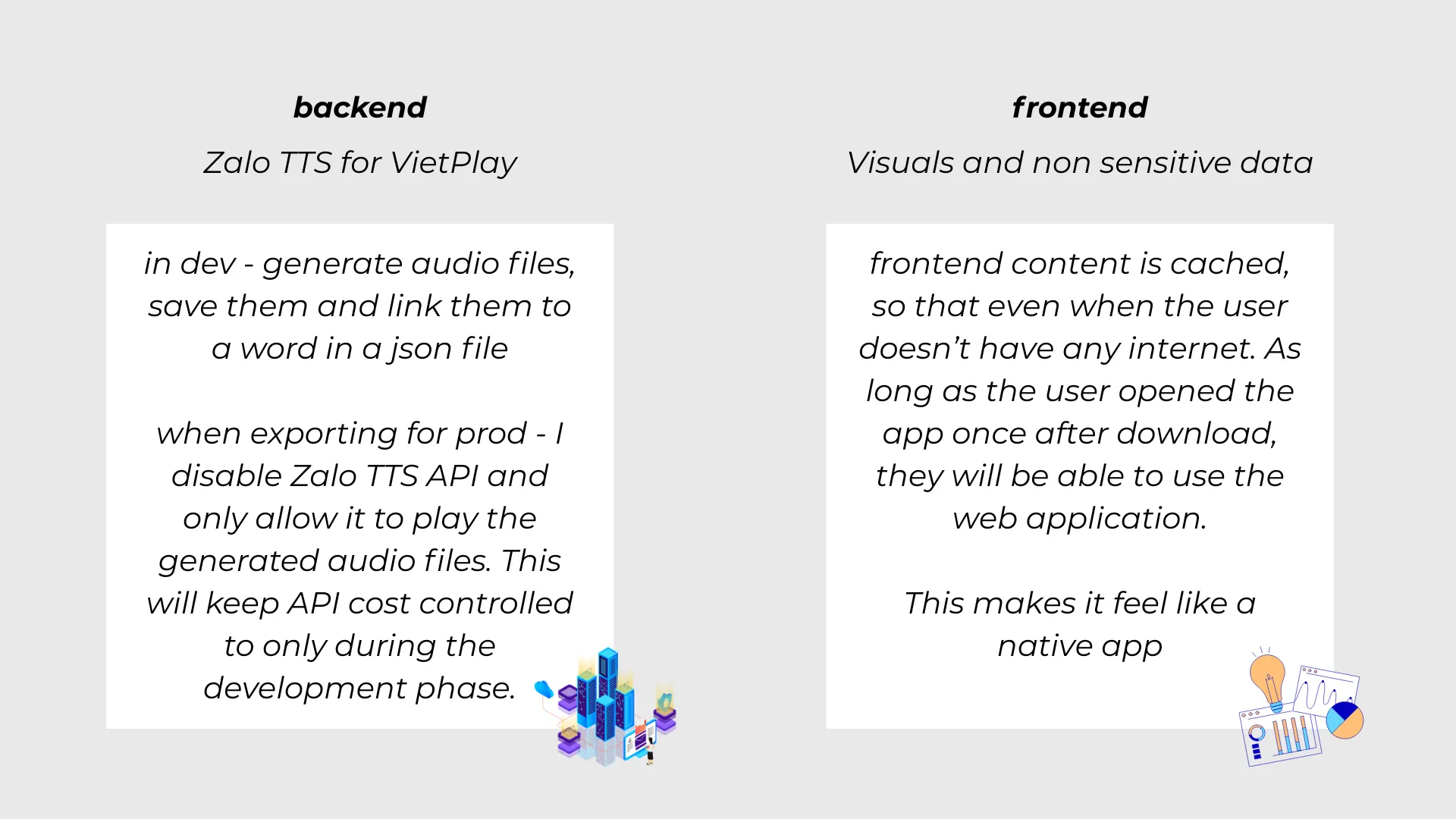
One important example of that last point is VietPlay. Instead of generating everything with TTS on demand, the system uses Zalo TTS for the flashcard words and core sentences, I then save it as mp3, cache and bundle them in the app, removing the TTS API in prod build. This makes sure that we don't run into unexpected API costs due to the app receiving more users.
The product goals across these prototypes were consistent:
• Make each app immediately understandable and low-friction to start using
• Keep the core task small and focused instead of expanding into feature bloat
• Support installable, local-first usage where it improves trust and convenience
• Give each app a distinct visual identity without compromising clarity
• Keep operating cost and maintenance realistic for small indie prototypes
• Test whether clarity, restraint, and strong interface character could make small utilities feel more worth keeping
The solution was focused prototypes that share the same UX philosophy while adapting their interface language to the task.
VietPlay
VietPlay focuses on approachable Vietnamese learning through repetition, recognition, and better pronunciation quality.
• It centers the experience on high-frequency vocabulary and simple flashcard-style learning instead of a noisy lesson system.
• It uses Zalo TTS for word and sentence audio, which gives the pronunciation a more native-like quality than generic browser or default TTS voices.
• It keeps the rest of the product localized separately so audio generation stays focused on the reusable pieces that matter most.
• It uses a soft, friendly visual style and large card-based interactions to make language practice feel approachable rather than academic.
• As a PWA, it can be installed quickly without app-store friction, which suits casual but repeated use.
Decodex
Decodex is built as a focused private utility rather than a social or cloud-based messaging product.
• It gives users a straightforward way to encode and decode messages using passphrase-based or key-based workflows.
• It is designed for offline-friendly use, which reinforces the privacy promise and keeps the tool self-contained.
• The interface uses a grid-based, systems-inspired visual language so signal, mode, input, and output feel explicit and easy to scan.
•The UX keeps the user in control by treating encoding as a direct tool action, not as an account-based service.
MoodCapture
MoodCapture reduces mood journaling down to its most repeatable core action: capture how you feel quickly and move on.
• It uses Microsoft emoji as the main emotional vocabulary, which makes the choices instantly readable and more expressive than text labels alone.
• The UI stays minimal so the user is not forced into long-form writing every time they check in.
• It supports visual summaries and export workflows, including PNG output for daily, monthly, or yearly mood records.
• The product treats mood logging as something lightweight and sustainable, not as a task that should demand emotional labor every time.
PROTO:COLOR Generator / ColorGen
ColorGen is both a useful standalone palette tool and a companion prototype for the PROTO:COLOR Blender workflow.
• It generates harmonizing palettes from seed colors using classic color modes such as analogous, triadic, tetradic, monochromatic, and complementary structures.
• It supports randomization while letting users lock seed colors or individual swatches so exploration does not destroy what is already working.
• It includes built-in themed presets, custom preset libraries, import and backup flows, and shareable palette URLs.
• It supports batch export to PNG, SVG, CSS, and JSON so palettes can leave the app easily.
• It includes color blindness preview modes, indistinguishable-color detection, and auto-adjustment support to make accessibility part of the workflow instead of an afterthought.
• It also tests how a free web tool can support a deeper Blender workflow without forcing users into paid software first.
Why The Shared Principle Matters
The strongest decision was not forcing these apps into a fake system. They are different ideas and different use cases. What links them is a shared UX principle rather than a shared product architecture.
Each one is built around the same core values:
1) fast start, low friction
2) focused scope
3) local-first trust where possible
4) memorable but task-appropriate visual identity
5) free access without pressure-heavy UX
That consistency is what makes the work feel more deliberate than a random set of side projects, even though the apps themselves are not one coherent ecosystem.
The prototype set evolved by pushing each app toward a clearer version of the same principle: remove overhead from recurring tasks.
VietPlay moved toward better pronunciation realism and a more sustainable audio workflow. The important UX choice was not just adding TTS, but choosing better-sounding TTS and limiting generation to the content that provides the most value.
Decodex moved toward clarity and self-containment. Its interface direction makes the encode and decode state feel explicit, while the offline focus supports the privacy story in a practical way.
MoodCapture moved toward lower emotional friction. The design relies on visual choice, minimal text burden, and exportable outputs so the journal feels lightweight enough to keep using.
ColorGen moved from a simple palette generator toward a more production-aware tool. Presets, locking, history, backup, sharing, export formats, sorting, and accessibility checks all push it closer to real use instead of one-off experimentation.
Seen together, the iteration path is consistent: the prototypes became more useful as they moved away from generic feature expansion and toward clearer workflows, stronger guardrails, and easier return use.
The biggest impact of this prototype collection is that it lowers the interaction cost of small but recurring tasks. These are not products that ask the user for a long session. They are useful precisely because they can be opened, used, and closed quickly.
App
Replaces
Primary UX Gain
VietPlay
generic language apps with weak pronunciation or too much gamified overhead
faster repetition and more believable audio reference
Decodex
online tools or overbuilt security interfaces for simple private message workflows
clearer privacy story and lower interaction overhead
MoodCapture
text-heavy journaling flows
faster emotional capture and more consistent daily use
ColorGen
disconnected palette exploration tools
quicker palette generation, better export paths, and a direct bridge into the Blender workflow
There is also a branding impact. Because the apps are small, free, and clearly designed, they help establish trust in TrinhLabs as a product lab with a point of view rather than a random portfolio label.
The value of these prototypes comes from both direct utility and design exploration.
At the platform level, PWAs reduce distribution friction, avoid app-store dependency, and keep shipping overhead relatively low. Local-first behavior also reduces backend complexity for ideas that do not need heavy cloud infrastructure.
At the product level, these prototypes work as small tests of product direction. Some are mainly exercises in interaction design and clarity. Others also have strategic value. ColorGen is the clearest example. It is useful as a free standalone web tool, but it also lets artists encounter the PROTO:COLOR workflow before deciding whether they want a deeper Blender tool.
VietPlay also shows how UX and technical sustainability can reinforce each other. Using high-quality TTS only for the reusable flashcard words and sentence content improves the product while also keeping token use manageable.
Taken together, the prototypes create a stronger TrinhLabs story:
• useful tools first
• low-friction access
• strong visual identity
• room to test which ideas deserve to grow further
It is basically a platform where I can test out my apps quickly to see if it has value and traction. Then after it gets users, we can take an idea and transition it from prototype to actual final product that could be released in the Google or Apple Appstore.
The first key takeaway is that small scope can be a strategic advantage. A prototype does not need to become a platform to feel valuable if it solves one job cleanly.
The second takeaway is that local-first and offline-friendly behavior are UX decisions as much as technical decisions. They make products feel calmer, more trustworthy, and less dependent on user commitment upfront.
The third takeaway is that visual identity should support the task. VietPlay feels soft and friendly, Decodex feels technical and private, MoodCapture feels light and expressive, and ColorGen feels like a serious creative tool.
The final takeaway is that small prototypes can still have strong strategic value. They can build trust, demonstrate taste, test product ideas quickly, and reveal which concepts deserve deeper investment.
Taken together, the TrinhLabs micro app prototypes show a consistent UX direction: remove friction from small recurring tasks, respect the user's attention, and make focused digital tools feel thoughtful and worth keeping.